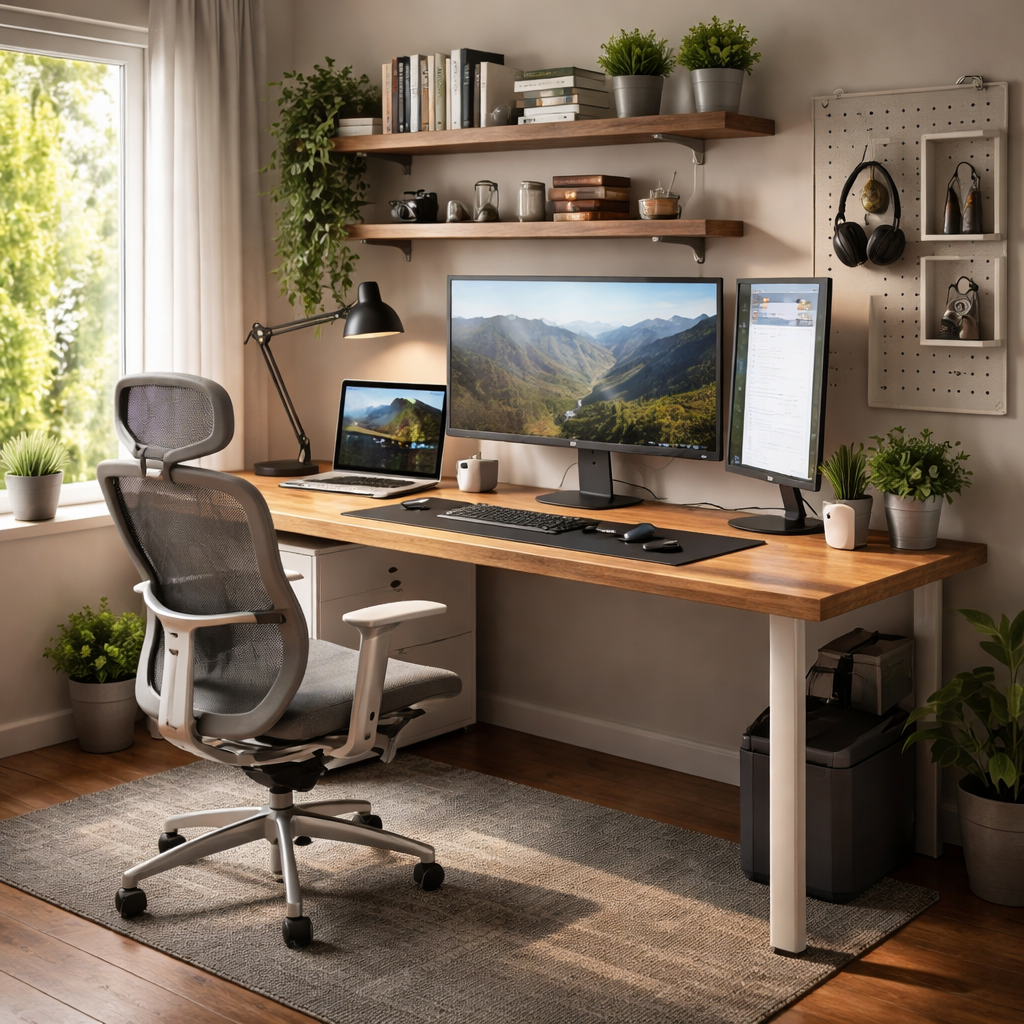
Most people underestimate how much their physical workspace shapes their focus, energy, and output throughout the day. If you’ve been searching for practical ideas for a home office setup that actually works — not just looks good in photos — this guide is built around real considerations: space constraints, budget limits, ergonomics, and the psychology of productive environments.
Start with the space, not the furniture
Before ordering a standing desk or a new chair, look at where you’re planning to work. Natural light, ambient noise, foot traffic from other people in your home, and proximity to the kitchen or living room — all of these matter more than most people expect. A corner near a window in a bedroom will almost always outperform a dedicated “office room” with poor ventilation and no daylight.
If you’re working with limited square footage, think vertically. Wall-mounted shelves, pegboards for accessories, and floating desks that fold against the wall when not in use can turn even a narrow hallway nook into a functional workspace. The key is separating your work zone visually and mentally from the rest of your living space — even a small rug or a room divider can create that boundary.
Desk and chair: where to spend and where to save
Your chair and desk are not equal investments. Ergonomics experts consistently emphasize that a quality chair matters far more than a premium desk surface. You sit in the chair — you just put things on the desk. Look for chairs with adjustable lumbar support, armrest height, and seat depth. You don’t need a $1,000 gaming chair; mid-range ergonomic options from brands like Hbada, Branch, or Autonomous offer solid support at a reasonable price point.
For desks, the most practical choice for most people is a simple, sturdy surface at the right height — typically 72–75 cm for average adult height when seated. Adjustable-height or sit-stand desks are genuinely useful if you have back issues or spend more than six hours a day at your workspace, but they’re not essential for everyone.
| Element | Budget pick | Mid-range pick | Worth splurging on? |
|---|---|---|---|
| Ergonomic chair | Hbada Racing Style | Branch Ergonomic Chair | Yes — daily use impacts posture |
| Desk surface | IKEA Linnmon + Alex | Flexispot E7 frame + top | Only if you need sit-stand |
| Monitor stand | Basic adjustable riser | Fully articulating arm | Monitor arms save neck strain |
| Keyboard & mouse | Logitech MK270 | Logitech MX Keys combo | Depends on typing volume |
Lighting: the most underrated part of any home office
Bad lighting causes eye strain, headaches, and — surprisingly — fatigue that people often mistake for overwork. Natural light from a window is ideal, but positioning matters: the light source should come from the side, not directly behind or in front of your screen. Glare on the monitor is one of the most common complaints among remote workers, and it’s almost always a lighting placement issue.
For artificial lighting, avoid relying solely on overhead ceiling fixtures. A dedicated desk lamp with adjustable color temperature (warm for evenings, cool white or daylight for focused daytime work) makes a significant difference. If you attend video calls regularly, a small ring light or a bias light behind your monitor will improve both your on-screen appearance and reduce eye fatigue from screen contrast.
Eye strain is one of the leading causes of reduced productivity among remote workers, and most cases are directly linked to poor lighting setup rather than screen time alone.
American Optometric Association
Cable management and desk organization
A cluttered desk isn’t just aesthetically unpleasant — research in environmental psychology suggests that visual clutter increases cognitive load and reduces the ability to concentrate. You don’t need a minimalist showroom, but keeping your workspace organized enough that you can find things quickly and see a clean surface makes a real difference.
Some practical approaches that work in real-life setups:
- Use a cable management box or under-desk tray to hide power strips and excess cable length
- Velcro cable ties cost almost nothing and eliminate 80% of desk cable chaos instantly
- A small desktop organizer for pens, notepads, and small items keeps surfaces clear without constant tidying
- If you use multiple devices, a wireless charging pad reduces cable clutter significantly
- Label cables with small tags or colored tape — especially useful if you regularly disconnect equipment
Sound and focus: an often overlooked layer
If you live with other people, or in a building with thin walls, acoustic comfort becomes part of your workspace setup. This doesn’t require soundproofing. Heavy curtains, a bookshelf filled with books, a small rug on a hard floor — all of these absorb sound and reduce echo. Noise-cancelling headphones are one of the highest-ROI purchases for anyone working from home in a shared environment.
Some people work better with ambient background sound. Apps and services like Noisli, Brain.fm, or even simple brown noise tracks on YouTube can mask distracting household sounds without the same cognitive interruption that music with lyrics creates. It’s worth experimenting — focus response to sound is genuinely individual.
Tech setup: screens, peripherals, and connectivity
A second monitor is consistently cited by professionals across industries as one of the most productivity-boosting additions to a home office. Whether you’re comparing documents, keeping a reference open while writing, or managing multiple applications simultaneously, dual screens reduce task-switching friction substantially. If a second monitor isn’t in the budget, an ultrawide display achieves a similar result in a smaller footprint.
A stable internet connection is non-negotiable for remote work. If your router is in another room and your Wi-Fi signal is weak at your desk, a wired ethernet connection through a simple adapter will eliminate most connectivity issues. A mesh network system is worth considering if your home is large or has thick walls that interfere with wireless signal.
Personalizing your space without losing function
One thing that separates a home office from a corporate cubicle is the freedom to make it yours. A plant on the desk, a piece of art on the wall, a favorite mug nearby — these small elements reduce the sterile, “temporary” feeling that can make remote work feel disconnected. Studies on workplace environments suggest that small personal touches genuinely improve motivation and sense of ownership over the space.
That said, personalization works best when it doesn’t compete with function. The goal is a space that feels inviting but still signals to your brain that this is a place for focused work. Keeping the desk surface itself relatively clear while adding personality through shelving, wall decor, or lighting achieves both.
Build it gradually, not all at once
One of the most practical pieces of advice for anyone setting up a home workspace is to resist the urge to buy everything at once. Start with a good chair and proper lighting — those two things will have the most immediate impact on comfort and health. Then observe what you actually need based on how you work: Do you need more storage? A second screen? A better microphone for calls? Let your real habits guide your next purchases rather than an idealized setup you saw online.
The best home office isn’t the most expensive or the most Instagram-worthy — it’s the one that makes you want to sit down and start working without friction, discomfort, or distraction.
